
When you apply for Lithuania visa, photo size is very important. You must submit photo that matches exact photo requirements of visa application centre. If your Lithuania visa photo does not meet required size and rules, your visa application can be rejected. Small mistake in photo can delay your visa process. So make sure your Lithuania visa photo size is correct and follows all official guidelines before you submit your application.
Lithuania Visa Photo Requirements Checklist
- Lithuanian passport photo background must be plain and light-colored
- Age of photo must not be more than 6 months old
- Face position should be straight and showing both edges of your face clearly
- Face size must be 70-80% of the photograph
- Focus should be sharp and clear
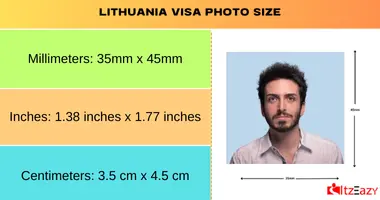
Lithuania Visa Photo Size
Here are Lithuania visa photo size options in different units
- Millimeters: 35mm x 45mm
- Inches: 1.38 inches x 1.77 inches
- Centimeters: 3.5 cm x 4.5 cm
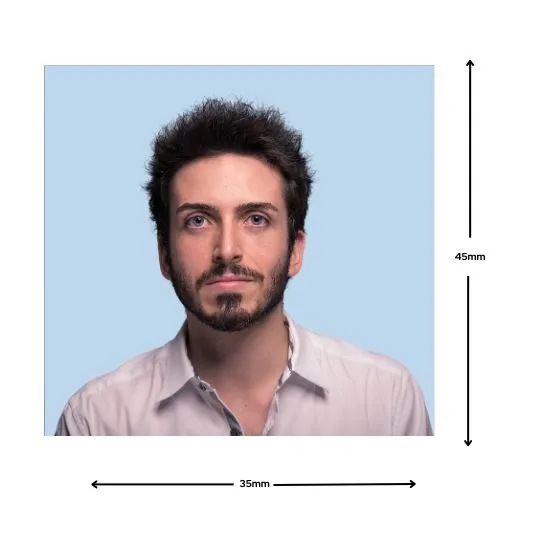
Lithuania visa picture requirements
- Lithuanian passport photo size should be in JPEG format.
- Minimum resolution is 350 dpi (dots per inch).
- Image should be at least 800 x 600 pixels in size.
- File size should not exceed 10 MB.
Stick one photograph to the application form in the designated space. If children are traveling with their parents, they need separate photo. Glue one photo of each child to application form of parent they are traveling with.
Photo Guidelines for Lithuania Visa in 2026
General Requirement for Lithuania Visa Passport Photo
- You need to submit two photos that are no more than six months old and Lithuania visa photo size must be 3.5 cm x 4.5 cm
- Take photo in a well-lit area with a plain background.
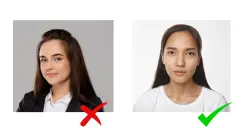
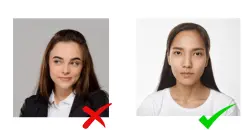
- Make sure subject’s face is centered and facing directly at camera.
- Photo should be clear and in focus.
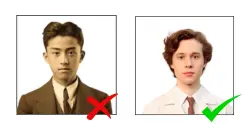
Composition of Lithuania passport photo size
- Head should take 70-80% of photo
- Look straight at camera with neutral face.
- Eyes should be at the center of the photo.
- Shoulders must be relaxed.
Focus and Contrast of Photo
- Ensure strong contrast between face and background
- Avoid blurry, too bright, or poor contrast photos
Lighting in your Passport Size Picture
- Avoid reflections, shadows, and red eyes
- Ensure uniformly spread brightness all over the face
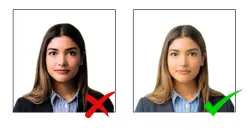
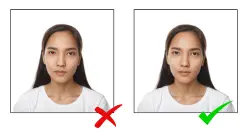
Photo Background Visa
- Background should be one colour, ideally neutral grey
- Avoid colourful, patterned, or shadowed backgrounds
Printing
- Print photo on high-quality paper with printing resolution of at least 600 dpi
- Skin tone of applicant should be natural
- Entire photo should be neutral, avoiding creases and layers
Facial Expression and Head Position
- Maintain neutral look with eyes focused directly on camera and mouth closed
- Avoid turning head or opening mouth
- Hair should be neat and tidy.
Eye Contact
- Ensure eyes are fully open and looking straight into the camera
- Avoid covering the eyes with hair or glasses
Wearing Glasses for Lithuanian Passport Photo Size
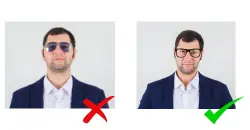
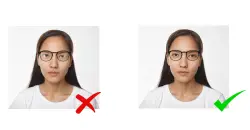
- You can wear glasses, but not with reflective lenses.
- No jewelry, headphones, or other accessories are allowed
- Avoid wearing sunglasses, dark optical glasses, or optical glasses with frames covering the eyes
- Photo is accepted only if your eyes are clearly visible, even if you wear glasses.
Headwear for Lithuania visa picture
- Avoid posing with headwear that covers the face, or having face shadowed by headwear
- Exception for religious headwear, but the face must be clearly visible
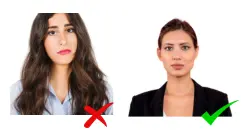
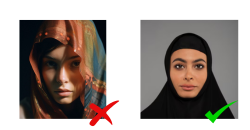
By following these guidelines, you’ll be able to submit correct Lithuania visa photo size that that meets the requirements for visa application. For more information visit the official visa photo requirements
FAQs
What is the photo size for Lithuania visa?
The Lithuania visa photo size must be 35mm x 45mm with a plain white or light-colored background. The photo should be matte or semi-matte, with a neutral expression and no shadows.
What color background for Lithuania visa photo?
For Lithuania visa photo, background must be plain white or light-colored. It should be clear, with no shadows, patterns, or objects. Your face must stand out against background.


Leave a Reply