
You can check vehicle loan status online through Parivahan portal. This helps you know if your car or bike is still on loan or hypothecation. In this guide, you will learn how to check vehicle hypothecation status online .
If you are looking for assistance to remove hypothecation from RC, Itzeazy is here to help you. Itzeazy is India’s no. 1 RTO service provider.
Steps to Check Hypothecation of Vehicle Online
You can check hypothecation of vehicle online through official website parivahan,
The steps to check hypothecation of vehicle online are given below:
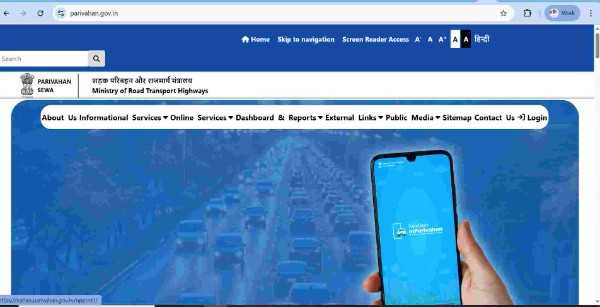
- Open the Parivahan website
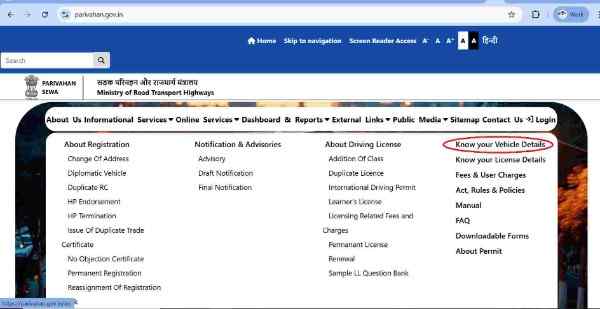
- On successful login, go to “Informational services” and choose “Know your vehicle details”.
- Register yourself using your mobile number and email id.
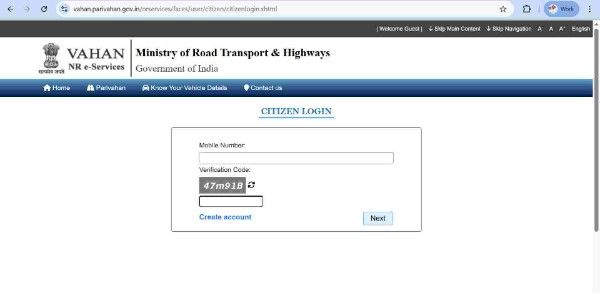
- Now login into the website using mobile number and password .
- Enter registered vehicle number and captcha code correctly. Press get details button.
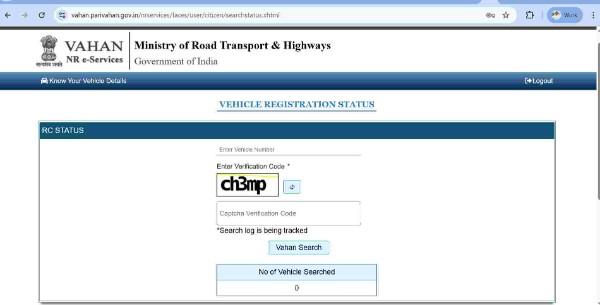
- Vehicle details will be displayed . If there is loan on the vehicle , In the finance , it will be shown as ” Yes ” . If there is no loan on the vehicle in finance no detail will be there.
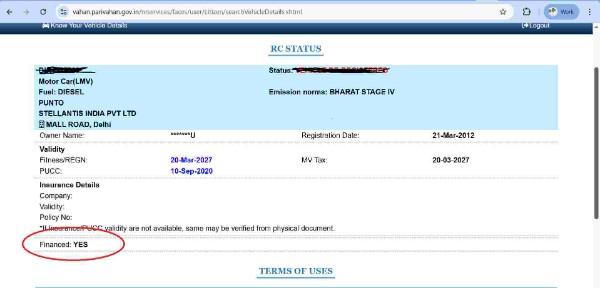
What is Hypothecation in RC
When you buy car or bike on loan, you are the registered owner however in RTO record it will be hypothecated to the bank.
When the loan is active
- The RC is in your name
- The RC will show that the vehicle is hypothecated to the bank
- If payments stop, the bank can take back the vehicle and sell it to recover the amount
After the loan is repaid
- You have to apply for hypothecation removal at the RTO
- Once the RTO removes hypothecation, the vehicle becomes fully yours with no lender claim.
The hypothecation on the RC protects the bank until the loan is completely repaid, after which you will get full ownership of the vehicle once the loan is cleared.
When do you need to cancel hypothecation from RC
After repaying loan on your vehicle, you should apply for HP termination from RC. It is essential for ownership transfer of car/bike in India and to apply for vehicle NOC.
Why regular online checking of vehicle loan status is important
If you have purchased vehicle on loan , you need to repay loan EMIs regular. Also you should keep track of the outstanding amount.
- When you check vehicle loan status online, you see your outstanding balance and the next EMI date
- Regular checks help you catch any errors in your payment history
- Correct records support a strong credit score
- Knowing your balance helps you plan early repayment and save on interest

How to Remove Hypothecation from RC online
RC transfer documents required
RC transfer fees for vehicle in India
FAQs
How long does it take to cancel hypothecation?
It takes approx. 30 days for removal of hypothecation. However it may vary RTO to RTO.
How do I delete hypothecation in RC from RTO?
Application for removal of hypothecation along with supporting documents should be submitted to the RTO:
- Original Vehicle RC
- Copy of address proof
- Copy of PUC certificate
- Two copies of Form 35
- NOC from bank
- Copy of insurance
Is it necessary to remove hypothecation from RC?
Yes, it’s important to remove hypothecation of a vehicle if the loan has been paid fully to the lender. Once you have got paid off the loan amount, make sure you get the NOC from the bank stating that there’s a no balance of your loan. However, you would have to apply for HP termination at the respective RTO. The transport department will remove it and transfer the complete title to the car owner. This ensures you’re the sole owner of the car.
How to check hypothecation status of vehicle online?
Here is how you can check hypothecation status online
- Visit the Parivahan Sewa website.
- Go to Online Services and then click on Know Your Vehicle Details.
- Log in or register
- Enter the vehicle registration number and Captcha.
- Open the vehicle details page.
- Check Hypothecation Details:
- If it’s blank or says “Hypothecation Terminated,” the vehicle is not on loan
- If it shows “Yes” or lists a bank/financial institution, the vehicle is currently on loan (hypothecated)
You can also use another method –
- Install the mParivahan app
- Use RC Search / VAHAN Search
- Enter the vehicle number to check Hypothecation Status

Govind Kumar
Darbhanga
Brijesh Yadav
Bike loan check