
Vehicle-related services are easily accessible through the Parivahan portal, making it convenient for users to manage registrations, licences, and other transport-related tasks online. However, to use these services smoothly, your mobile number must be correctly registered on the platform, as most processes require OTP verification.
If your number is outdated, inactive, or not linked to your account, you may face issues while accessing these services. But there’s no need to worry. Updating your mobile number on Parivahan is a simple process.
In this article, we’ll guide you through everything you need to know about the Parivahan mobile number update process, so you can continue using all services without any interruptions.
Parivahan Sewa
It is a portal of the Ministry of Road and Highways of India (MoRTH). It has brought all records into the digital mode in hundreds of offices throughout India. It has brought out transparency and security. The main objective is to provide great quality service to all the citizens of India and non-residents as well.

Driving Licence Address Change
Documents Required for Driving Licence Address Change
Medical certificate for renewal of driving license
Update Mobile Number in Parivahan
Here is how you can do a Parivahan mobile number update.
Step 1: To update the mobile number in Parivahan, the user has to Login into parivahan website
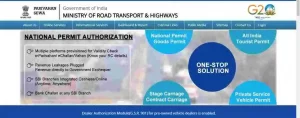
Now click on -> online services -> vehicle-related services
Step 2: Once you click on vehicle-related services, on the next page, you will get the option to choose the state where the vehicle is registered. Choose the state from the drop-down menu correctly.
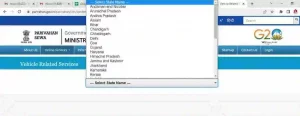
Step 3: After selecting the RTO where the vehicle is registered, the next screen is this.
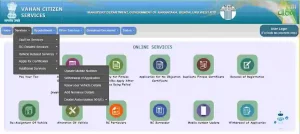
Click on Services -> Additional services -> Update mobile number
Step 4: You will get this screen. Enter vehicle detail correctly.
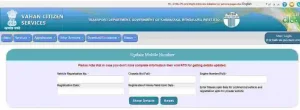
Values to be entered are :
- Vehicle Registration No.
- Chassis No (Full)
- Engine Number(Full)
- Registration Date
- Registration/Fitness Valid Up To Date
These details you will get on the RC of the vehicle. Enter the correct detail
Click on –> show details.
Step 5: In the next screen, enter the name of the registered owner of the vehicle as per Aadhar and the mobile number registered with Aadhar.
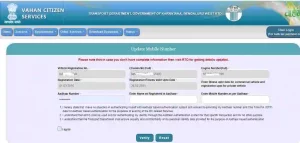
Check in the box -> I agree
Click on -> Verify
Step 6: On the registered Mobile Number, you will get an OTP. Enter that OTP.
You will get the message of successfully updating your mobile number in Parivahan.
Driving Licence Mobile Number Change
How to change my mobile number in my application? Here is the ultimate guide for driving licence mobile number change
- Visit https://vahan.parivahan.gov.in/vahanservice/vahan/
- If you are a new user, kindly “Register” First or log in and continue
3. Click on “Other Services” and Select “Update User Mobile No.”
4. Enter your Registration No and Previous Registered Mobile Number
5. Click on Generate OTP and Enter OTP to Submit
6. Enter the new Mobile Number and click on the “UPDATE” button
Now, in the next section, we will talk about how to change the mobile number in the learning license.
How to Update Mobile Number in Parivahan: A Simple Guide
Whether you’re applying for a driving licence, renewing your vehicle registration, or accessing transport services online, having your correct mobile number linked to the Parivahan portal is essential. Most services rely on OTP verification, so even a small issue—like an outdated number—can disrupt the entire process.
Many users face common problems such as not receiving OTPs, losing access to their old number, or switching to a new one. In such situations, updating your mobile number becomes necessary to continue using services without interruptions.
The Parivahan portal, managed by the Ministry of Road Transport and Highways (MoRTH), allows users to easily update their registered mobile number. This ensures you stay connected and can complete applications, track statuses, and receive important updates without any hassle.
In this guide, we’ll walk you through the step-by-step process to update your mobile number on Parivahan, so you can access all transport-related services smoothly and securely.
Learner’s License Parivahan Mobile Number Update
Here is the procedure for the learner’s license Parivahan mobile number update
Steps follow for Mobile number update in License:-
1. Visit https://sarathi.parivahan.gov.in/
2. Select the concerned state
3. Click on “Mobile Number Update” from the “Others” menu
In the previous section, we discussed the procedure for driving licence mobile number change and the procedure for learner’s license Parivahan mobile number update. Now, we will discuss how to update the mobile number in Parivahan
How to Change Mobile Number in Driving Licence (DL)
To update your mobile number in the Driving Licence (DL) section:
Steps:
- Visit 👉 https://vahan.parivahan.gov.in/vahanservice/vahan/
- Register/Login to your account
- Go to Other Services > Update User Mobile No
- Enter your Registration Number and previously registered number
- Generate OTP → Enter it → Enter New Mobile Number
- Click on UPDATE
How to Update Mobile Number in Learner’s Licence (LL)
To change the mobile number for a learner’s license:
Steps:
- Visit 👉 https://sarathi.parivahan.gov.in
- Choose your state
- Go to Others > Mobile Number Update
- Enter your application and Aadhaar details
- Enter OTP sent to Aadhaar-linked mobile
- Submit and confirm
Frequently Asked Questions (FAQs)
Can I update mobile number without Aadhaar?
No, an Aadhaar-linked mobile number is mandatory for verification.
Can I update the number offline?
Yes, by visiting your local RTO with supporting documents.
How long does the update process take?
Usually instant, but may take 24-48 hours to reflect in some cases.
Is there any fee to update the mobile number?
No, the service is free of cost.
Can I use the same mobile number for multiple vehicles?
Yes, a single number can be linked to multiple vehicles.

D. N. Sharma
Register mobile number
Yogesh
Sir RC me Mobile number update ho jayega kya
itzeazy
yes
Gurpergat Singh
My motorcycle RC in not updated my mobile number that’s it please update my mobile number in my motorcycle RC
Dinesh Himral
Sir RC m mobile no update ho jayega kya
Neyaz.Ahmad
Sir mera mobile number kise change kise kare