


Learn how to download a masked Aadhaar card online via UIDAI myAadhaar portal. Step-by-step instructions, password format, and legal validity explained.
With rising concerns over identity theft and unauthorized use of personal credentials, the Unique Identification Authority of India (UIDAI) introduced the Masked Aadhaar feature. A masked copy provides legal proof of identity while concealing sensitive identification digits from unauthorized access.
This guide walks you through the step-by-step process of downloading a masked copy online, opening the password-protected PDF, and understanding where it can be legally used.
What is a Masked Aadhaar Card?
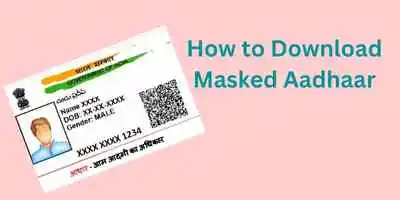
A Masked Aadhaar is a legally valid version of your e-Aadhaar where the first 8 digits are hidden or masked with cross marks (e.g., XXXX-XXXX), and only the last 4 digits are visible.
It carries:
-
A digitally signed QR code from UIDAI.
-
Your photograph, name, date of birth, gender, and address.
-
The concealed identifier format that prevents misuse during offline sharing.
┌─────────────────────────────────────────────────────────────┐
│                    GOVERNMENT OF INDIA                      │
│  [Photo]     Name: Rahul Sharma                             │
│              DOB: 15/08/1990 | Gender: Male                 │
│                                                             │
│              XXXX  XXXX  1234  <-- (First 8 Digits Masked)  │
│              [Digitally Signed Secure QR Code]              │
└─────────────────────────────────────────────────────────────┘
Why Should You Use a Masked Copy?
-
Protects Sensitive Identity Details: Prevents third parties from harvesting your complete record.
-
UIDAI Recommended: The Ministry of Electronics and Information Technology (MeitY) advises citizens to share masked copies with hotels, private establishments, and offline service providers instead of photocopies displaying the full number.
-
Legally Valid: Equivalent to a physical card for identity verification across airlines, hotels, train travel, and e-KYC.
How to Download Masked Aadhaar Card Online (Step-by-Step)
To download your masked e-copy, ensure your mobile number is registered with UIDAI to receive the one-time authentication passcode (OTP).
-
Visit the Official myAadhaar Portal: Navigate to
myaadhaar.uidai.gov.in. -
Select Download Aadhaar: Scroll down to the services menu and click on “Download Aadhaar”.
-
Enter Identity Credentials:
-
Choose to enter either your Aadhaar Number, Enrolment ID (EID), or 16-digit Virtual ID (VID).
-
Enter the Captcha code shown on the screen.
-
-
Request OTP: Click on “Send OTP”. A 6-digit verification code will be sent to your registered mobile phone.
-
Tick the Masking Option (Crucial Step):
-
Right above the OTP entry field, check the box: “Do you want a masked Aadhaar?”
-
Note: If you leave this box unchecked, a standard copy showing all 12 digits will be downloaded instead.
-
-
Enter OTP & Download: Enter the 6-digit OTP received on your mobile and click “Verify & Download”.
-
Your digitally signed PDF will be downloaded immediately to your device.
How to Open the Downloaded Masked PDF (Password Format)
Every e-copy downloaded from the UIDAI portal is secured with an 8-character password.
The password combination is:
First 4 letters of your Name (as printed on the card) in CAPITAL letters + 4 digits of your Year of Birth (YYYY).
Examples:
-
Name: SURESH PATEL | Year of Birth: 1985
Password:
SURE1985 -
Name: RIA SEN | Year of Birth: 1996
(For names with 3 letters, use first 3 letters followed by DOB)
Password:
RIA1996 -
Name: P. KUMAR | Year of Birth: 1990
Password:
PKUM1990
Where is Masked Aadhaar Accepted?
| Acceptance Venue | Status | Remarks |
| Airport Entry & Airline Check-in | Accepted | Valid photo ID proof at all CISF security checkpoints. |
| Hotels & Hospitality Check-in | Accepted | Recommended by UIDAI guidelines over unmasked copies. |
| Railway (IRCTC) Travel Verification | Accepted | Recognized by TTE along with digital display. |
| Bank Account Opening & Mutual Funds | Accepted | Accepted for paperless e-KYC and offline verification. |
| Government Welfare Schemes | Conditional | Certain direct benefit transfer (DBT) schemes require unmasked verification. |
Prefer not to share your demographic digits anywhere? You can also generate and use a temporary 16-digit Virtual ID (VID) for identity verification.
Frequently Asked Questions (FAQs)
Q1. Is a masked Aadhaar legally valid everywhere?
Yes. According to UIDAI guidelines, a masked e-Aadhaar is legally valid for identity verification across airports, hotels, and KYC processes. It carries equal legal standing to a physical card.
Q2. What is the difference between regular e-Aadhaar and masked Aadhaar?
A regular e-Aadhaar displays all 12 digits, whereas a masked copy displays only the last 4 digits (with the first 8 digits concealed as XXXX-XXXX). Both versions carry identical demographic details and secure QR codes.
Q3. Can I download a masked copy if my mobile number is not registered?
No. Downloading an electronic copy requires OTP verification sent to your UIDAI-registered mobile number. If your mobile number is not updated, you must visit an Aadhaar Seva Kendra to update your records.
Q4. Is there any fee for downloading a masked Aadhaar?
No. Downloading a digital copy via the official UIDAI myAadhaar portal is completely free of charge.
=””]

Birendra kumar
Aadhar Card
Sudhar
KESHAR Rajendra Dhamale
Cheng of bday date